Build the walls. Skip the paperwork.
Draw any LED configuration in SketchUp — flat walls, curved rigs, multi-screen layouts — and walk away with a vendor-ready package the same day the design is final. Screen schedules, raster maps, panel specs, and JSON output. All of it, automatically.
$299 to start · No monthly plan
Parametric LED wall design for SketchUp — build, spec, and export production-ready screens without leaving your model.
For the designers who used to spend half the day building tile geometry just to get a render approved: you don't anymore.
Drop in real panels instantly, block the show, and what you created is the technical drawing. Hand off an accurate render with correct screen sizes alongside a complete package — dimensions, specs, raster maps, the works. The creative is yours. Everything else takes care of itself.
FULL WALKTHROUGH
From concept to delivery in minutes.
Arena rig, studio set, multi-screen layout — the complete workflow from first wall to finished output package.
SEE THE WORKFLOW
Build it. Change it. Export it.
Three short loops. One complete workflow inside SketchUp.
Start with a flat wall, a curve, or a one-off configuration using real panels or your own custom tile.
Swap products, resize the system, update curvature, and preview the result live without rebuilding from scratch.
Generate screen schedules, raster maps, JSON exports, and production-ready output from the current model — in one step.
PRODUCTION OUTPUT
The drawings teams actually hand off.
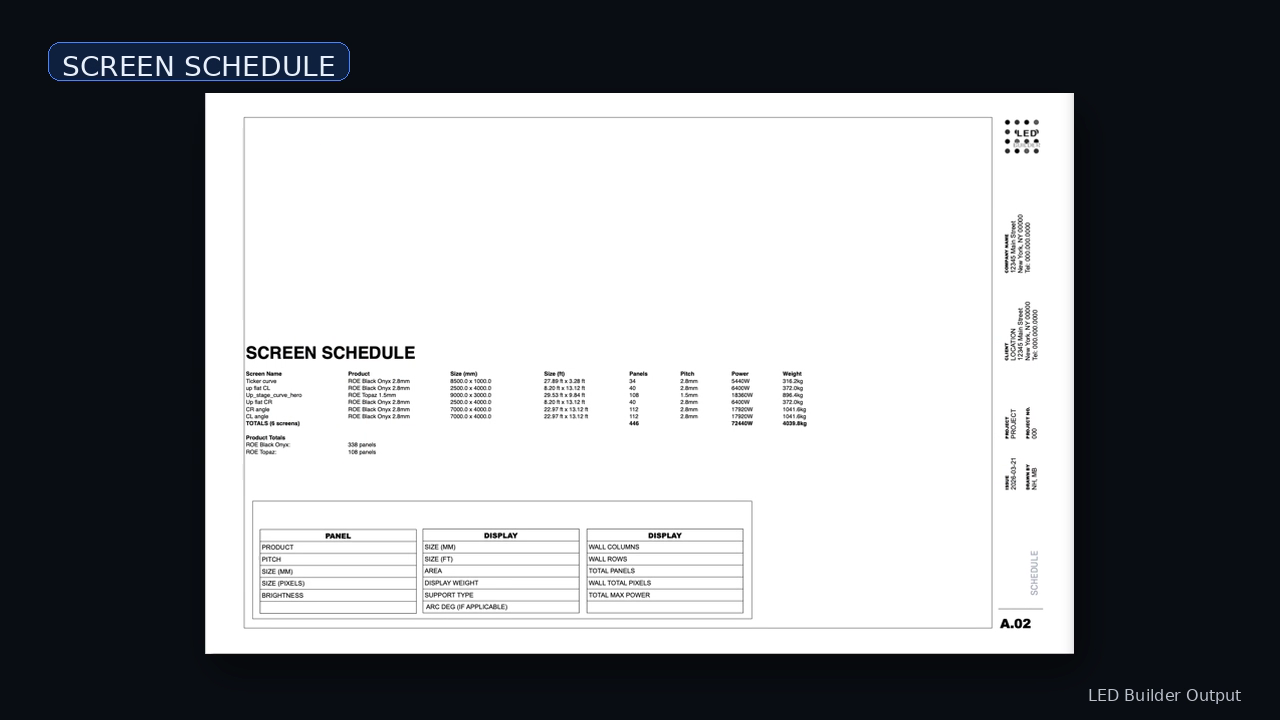
Every screen. Every number. Automatic.
Counts, dimensions, weight, power, and product data — organized automatically from the current model.
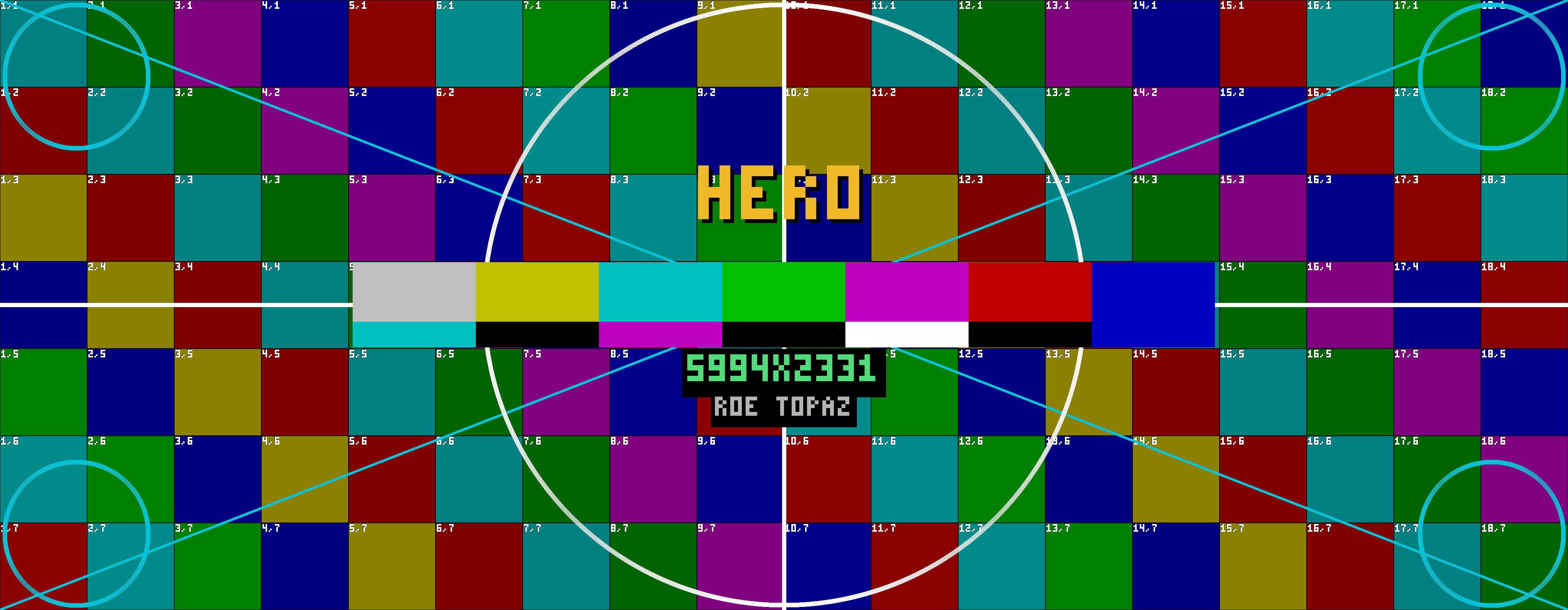
Color-coded, numbered, ready for media servers.
Color-coded, numbered panel maps sized to the real screen resolution.
Vendor-ready. Same day the design is final.
Vendor-ready output the same day the design is final.
Download sample package PDFPANELS + CUSTOM TILE
Use the panels you know — or define the one you need.
Start with real-world products from major LED brands. When a job calls for something outside the catalog, build a custom tile in seconds and keep the exact same workflow.
Build a panel that is not in the library yet.
Define tile size, resolution, and pixel pitch. LED Builder turns it into a reusable, spec-ready product with the same documentation workflow as any built-in panel.
Panel data powers SPEC sheets, raster layouts, and numbering automatically.
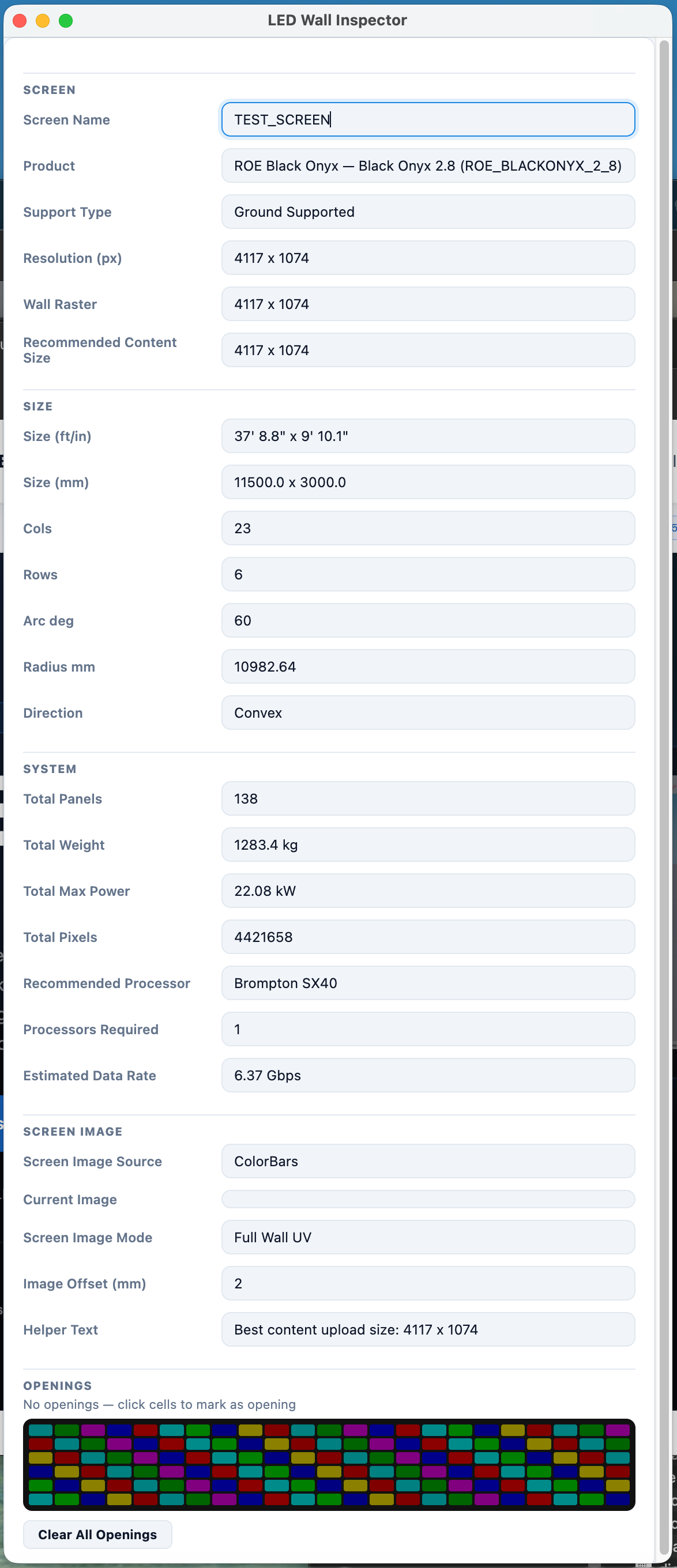
WALL INSPECTOR
Everything in one panel.
Every setting for every wall is right where you are working.
- Live updates apply instantly
- Change panel, size, and curve at any time
- Image and UV control stay inside the workflow
- Flat and curved walls use the same interface
TOOLBAR REFERENCE
Core tools, right where you work.
Build walls, curve screens, place single panels, apply skins, and export without leaving SketchUp.

-
01
Build Wall Create a new flat LED wall from any panel in the library
-
02
Curved Wall Build a curved screen with configurable arc and radius
-
03
Single Panel Place an individual panel without a full wall configuration
-
04
Apply Skin Map image content to a screen surface with UV control
-
05
Export Generate the full SPEC, RASTER, JSON, and LayOut drawing package
-
06
Wall Inspector Open the properties panel for the selected wall
PRICING
Start using LED Builder today.
Try the full workflow, build real screens, and export usable output before you pay anything.
Standard pricing is $349 — get in while it's early.
- ✓ 3-day free trial
- ✓ Real panel library
- ✓ Custom tile builder
- ✓ Wall Inspector
- ✓ Screen-package / JSON export
- ✓ PNG raster export
- ✓ Production-ready LayOut output
Secure checkout via Stripe. No monthly plan in v1.
macOS: full workflow including LayOut output. Windows: screen building, inspector, screen-package / JSON export, and PNG raster export. Windows LayOut output is on the roadmap.
Need licenses for your whole team? Contact us about enterprise options.
Frequently asked questions
Everything you need to know before you start.
Start by choosing a panel or custom tile, then place a flat, curved, or single-screen wall directly in SketchUp.
Yes. LED Builder supports flat and curved walls. Custom Tile Builder lets you define panels that are not already in the library and use them in the same workflow.
Yes. LED Builder is built for single screens, multi-screen systems, and projects with multiple wall types in one document.
Exporting generates screen schedules, PNG raster maps, JSON screen packages, and LayOut-ready documentation from the current model: SPEC sheets, numbered panel views, and complete drawing pages.
Yes. Make changes in the model and regenerate the package from the latest design state.
Screen building, inspector editing, screen-package / JSON export, and PNG raster export are all fully supported on Windows. LayOut output — the actual drawing package — is macOS-only for now and is coming to Windows. If the drawing output is critical to your workflow and you're on Windows, check back in a few months.
Start a trial and use the full product — real panel library, custom tiles, Wall Inspector, all export types — for 3 days at no charge. No limits on what you can build or export during the trial.
Manual modeling gives you geometry. LED Builder gives you geometry plus panel logic, documentation, numbering, and export-ready output — all from the same model.
Not right now. LED Builder is annual only — it's the kind of tool you reach for on every show, so the pricing is built around that.
It's launch pricing. We're keeping it accessible while we're early and growing the panel library. It goes up at some point — we just haven't decided when.
THE PRODUCTION SUITE
Four tools. Every stage of production.
Each extension works standalone or together. One 3-day trial per tool — subscribe to keep access.